Originally published on LinkedIn.
Introduction
Cost and Rate optimization is one of the key outcomes of the FinOps domain, specifically “Optimize usage and cost.” Where there are many layers and ways to do it, starting from Compute Savings plan to dig deep into the coding, here I am going to show, from a FinOps point of view, how to compare different versions of Lambda Runtime and how that reflects in the cost.
Here, we will take an example of the AWS Lambda Python versions and their impact on Cost. Here is a step-by-step guide on how you can do a comparison of different versions at runtime to find the effectiveness.
Why this experiment?
Briefly explain:
- You wanted to validate how memory configuration affects cost and performance in AWS Lambda.
- This is a reproducible experiment that others can run in under X minutes.
Baseline: the Lambda setup
- Runtime you used (e.g., Node.js / Python)
- What the function does (e.g., simple CPU-bound or I/O-bound logic)
- Baseline memory configuration (e.g., 128 MB)
- How you triggered it (e.g., via AWS Console / CLI / load test)
Runtime: Python 3.XX
Region: eu-central-1
Trigger: Manual, 100 invocations per config
Observation: Duration and billed cost for each config
Benchmark:
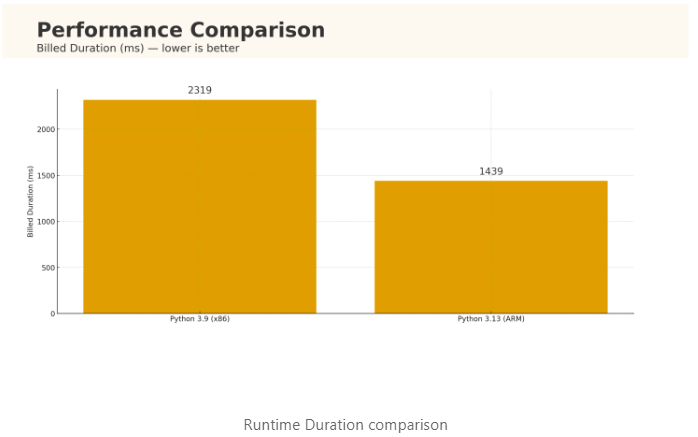
At 128 MB memory, moving a CPU-bound Lambda from Python 3.9 (x86) to Python 3.13 (ARM/Graviton) cut billed duration from 2319 ms → 1439 ms (≈38% faster) and compute cost from ~$4.83 → ~$3.00 per 1M invokes (≈38% cheaper). Your mileage will vary—measure it in your own account.
How to reproduce (10-minute experiment):
Create two identical functions (same code & memory):
my-fn-py39 → runtime python3.9, arch x86 my-fn-py313 → runtime python3.13, arch arm64 (Graviton)
Use a small CPU-bound workload to expose runtime differences:
# a memory intensive program to compare lambdas

import time, math

def lambda_handler(event, context):
    t0 = time.time()
    s = 0.0
    # replace with any other extensive function that takes time
    for i in range(1_000_000):
        s *= math.sqrt(i)

    dur = time.time() - t0
    mem_mb = int(context.memory_limit_in_mb)
    billed_ms = ((int(dur*1000) + 99)//100)*100  # round up to nearest 100ms
    gb_seconds = (mem_mb/1024.0) * (billed_ms/1000.0)
    return {"duration_s": round(dur,3), "billed_ms": billed_ms, "gb_seconds": round(gb_seconds,4)}
Invoke 10–20× each and average:
for i in {1..10}; do aws lambda invoke --function-name my-fn-py39 out.json --log-type Tail >/dev/null; done

for i in {1..10}; do aws lambda invoke --function-name my-fn-py313 out.json --log-type Tail >/dev/null; done
Validate with CloudWatch Logs Insights (paste into Logs Insights for each function)
fields @timestamp, @message
| parse @message /REPORT.*Duration: (?<d>\d+\.\d+) ms.*Billed Duration: (?<bd>\d+) ms.*Memory Size: (?<mem>\d+)/
| stats avg(bd) as avg_billed_ms, pctile(bd,95) as p95_billed_ms by @log
My mini case study (how the math pencils out)
Below is the Input, output, and their differences study. The study is done using GB-s which is the unit of measuring the lambda runtime/cost (more details in the next section). And cost is calculated based on the “us-east-1” region.

Inputs (steady-state):
Python 3.9 (x86): billed 2.319 s @ 128 MB → GB-s ≈ 0.125 × 2.319 = 0.2899 GB-s Python 3.13 (ARM): billed 1.439 s @ 128 MB → GB-s ≈ 0.125 × 1.439 = 0.1799 GB-s
Compute cost per 1M invokes (excl. request fee):
3.9: 0.2899 × 1e6 × 0.0000166667 ≈ $4.83 3.13: 0.1799 × 1e6 × 0.0000166667 ≈ $3.00
Delta: ~38% lower duration and cost.
Add $0.20 per 1M for request charges (same for both).
Why this works (understand through calculation and data):
- Lambda bills on GB-seconds + requests. Price (typical x86 baseline) is $0.0000166667 per GB-second + $0.20 per 1M requests (free tiers apply). Formula: GB-seconds = (Memory_Allocated_GB) × (Billed_Duration_s); Cost = GB-seconds × rate.
- Graviton (ARM) is built for better perf/$ on Lambda. AWS reports up to ~19% better performance and ~20% lower cost vs x86 for many serverless workloads.
- Python 3.13 brings runtime improvements (plus experimental free-threaded build and a JIT you shouldn’t enable in prod yet). Expect small to moderate wins depending on workload; always test.,
FinOps playbook: quick wins that compound:
- Right-size memory = right-size CPU
Lambda allocates CPU proportionally to memory; increasing memory can reduce duration and total cost for CPU/IO-bound code. Use Compute Optimizer recommendations and/or Lambda Power Tuning (Step Functions) to discover cost-optimal points.
- Switch to ARM/Graviton (where libs permit)
For many Python workloads, Graviton yields better perf/$ and a lower rate card. A/B test both architectures. Results vary by dependency set and runtime.
- Upgrade your runtime thoughtfully
Move from 3.9 -> 3.13, rebuild layers/wheels for the new ABI, and test. Don’t assume a fixed % win; measure with your real traffic. Just for the sake of this benefit, you should not do it; remember, the business should not be impacted.
- Trim cold starts & package size (Powertools recipes)
Practical steps from Powertools for AWS Lambda (Python) performance guide:
Minimize package size: strip pycache, tests, examples; prune .dist-info, etc. Prefer compiled dependencies where possible. Use optimized layers (install only prod deps, remove debug symbols). Consider Provisioned Concurrency for latency SLAs; use SnapStart when your runtime supports it. (Validate behavior after each optimization; trimmed files can break some packages.)
- When you need predictable latency
Provisioned Concurrency keeps execution environments warm (you pay a lower GB-s rate for the “warm pool”, and a different compute rate while enabled). Model both compute and provisioned charges in your business case.
Cost modeling cheat-sheet:
Compute: GB-s = (memory_mb/1024) * billed_duration_seconds compute_cost = gb_s * $0.0000166667 (x86 baseline; region/arch can vary) Requests: requests_cost = (requests - free_tier) * $0.20 / 1e6 Provisioned Concurrency: separate GB-s price for provisioned hours + different compute price while enabled.
This is the starting point of cost optimization for a lambda, and this is a very low-hanging fruit. As mentioned before, you need to dig deep into the code, understand the non-functional requirements, and cost optimize in such a way that functional requirements stay the same with a huge margin of gain in the operational excellence.
Also, python 3.14 is released last week, and I see significant changes in that, waiting that to be included in AWS Lambda platform soon.